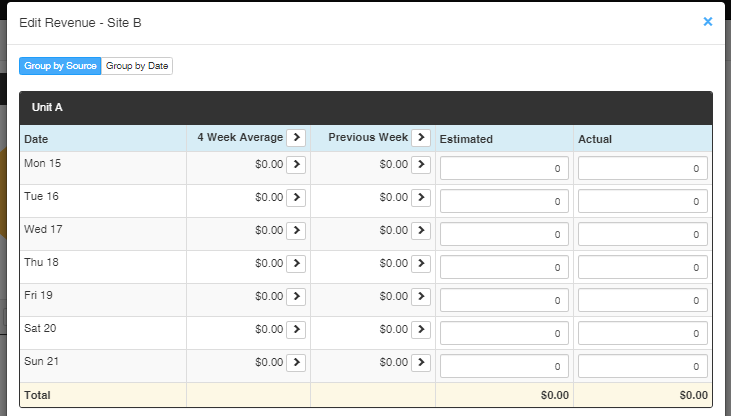
Depending on your business, you may want to input your revenue on a particular frequency (cycle). goRoster currently supports two input cycles (Daily or Weekly).
This feature is only available on Premium or Enterprise Subscriptions.
Account Settings
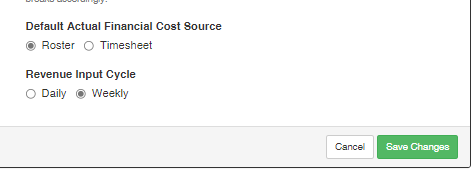
The default revenue input cycle is Daily. To change this open the left hand menu bar > Settings > Account Settings > Settings Card > Revenue Input Cycle > Set to 'Weekly' > Save Changes.
Note: When changing from a Weekly Cycle to a Daily Cycle any revenue figures which haven't yet been entered for the week
Editing Revenue
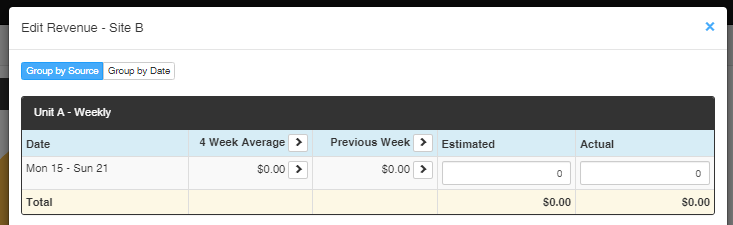
With Revenue Input Cycles enabled you will also have the option of setting your Estimate Revenue from the Previous week or 4 Week Average. This can be done for both Weekly or Daily figures. To Set these values simply click on the arrow beside the value or title.
Weekly Input:
Daily Input: